AgeShift

Adaptive training app

What are you training for?

AgeShift is an adaptive training app. Answer a few questions and a week appears, already accounting for pain, time, and the rest of your life.

Adaptive training app

What AgeShift is

AgeShift is an adaptive training app. On this page you tell it what you are training for: a first half marathon, getting stronger around a sore knee, a triathlon, or muscle plus VO₂ max. It builds a first week before you create an account. Each answer rewrites the week: event date, recent volume, pain, days you can train, session length, other sports, and equipment. Wearables and Fuel join after you save the plan.

What it is
Adaptive training week, before an account
How it starts
Goal, then pain, time, sports, and equipment
Price
21-day trial, then from €60/year

Why a general chat falls short

ChatGPT and Claude can already write a plan.That was never the hard part.

It asks the question you would have left out

A general chat answers the question you typed. AgeShift asks the three you didn't, and each answer rewrites a line of the plan.

Most bad plans are great answers to a question that was too small.

AgeShift, before it writes anythingTap an answer

I want to run a half marathon.
1 / 5

Exercise-first

Open the session. The how‑to is already on it.

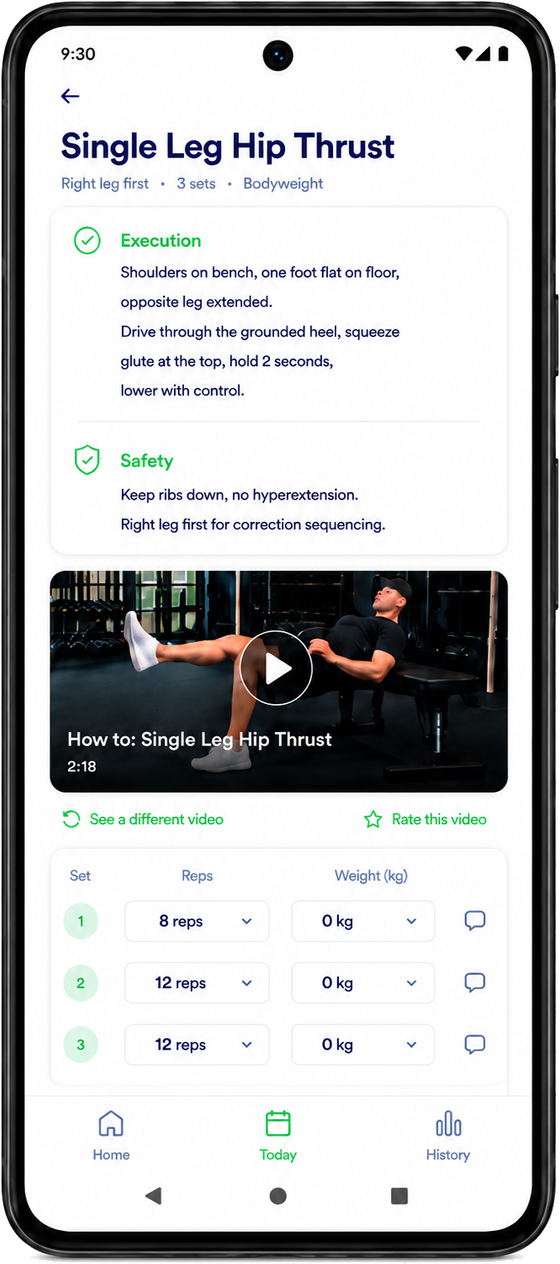
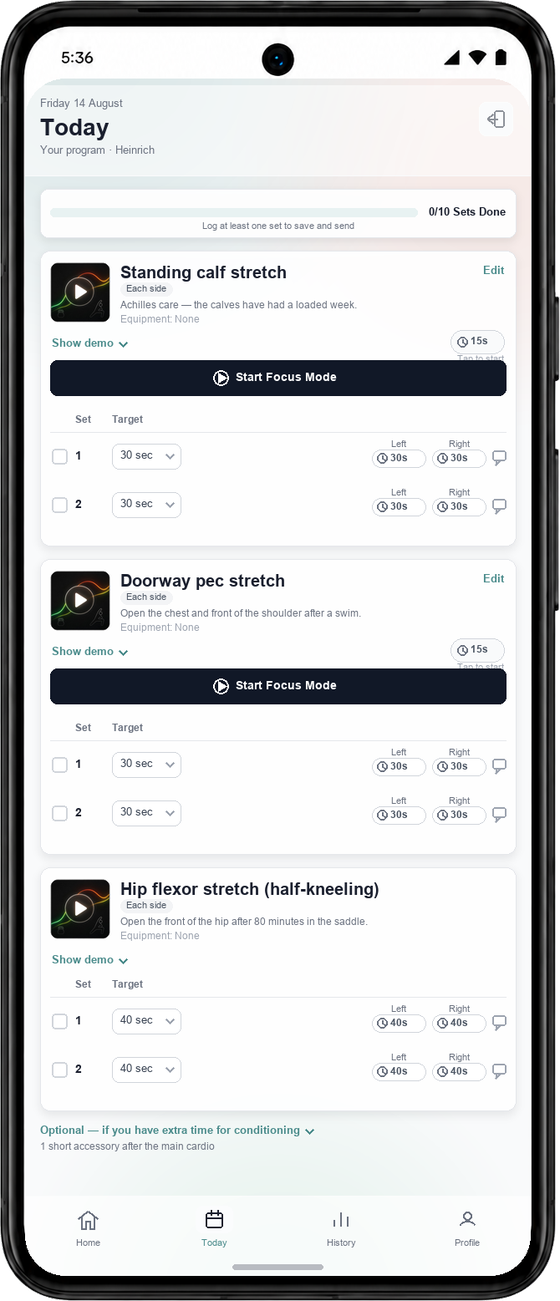
A chat answers in paragraphs, and finding Tuesday's sets means scrolling past everything you asked since. AgeShift opens on the exercise: the sets, your last numbers, the cues, and a real demo video.

  • Real demo videos, inside the exercise

    Every exercise carries a filmed demonstration and its cues. Mid-set, you tap once. No switching apps to find a how-to.

  • A deep library

    Strength, mobility, rehab, and conditioning, each with execution and safety notes, and a swap ready when a movement does not suit you.

  • Your history on every set

    Last weight, last reps, and how it felt sit on the set you are about to do. Context matters, so it lives where you use it.

AgeShift's Today screen, with each exercise, its demo, and its setsAn AgeShift exercise page with execution and safety cues and a demo video

What that becomes

Every constraint has to survive into the week.

Sleep, pain, the calendar, the other sport, and the work you already did are the inputs. The session changes when they do.

Pain and injuries

Name the knee and the session stops using the movement that irritates it. The work still happens.

Sleep and recovery

A bad night shortens today. The rest of the week stays intact.

The week you actually have

Thirty-five minutes on Tuesday stays thirty-five minutes. Whatever did not fit moves, or it drops.

Every sport in one load

The lift, the run, and Thursday's game are one body. AgeShift counts all of it before it adds more.

Wearables, when you want them

Garmin, WHOOP, Oura, Polar, COROS, and Apple Health can feed recovery after you save the plan. The first week does not wait for them.

Fuel, next to training

Meals sit beside the work they have to support. That part of AgeShift opens with an account.

Connects later

Wearables join the plan. They don't gate it.

  • Garmin
  • WHOOP
  • Oura
  • Polar
  • COROS
  • Apple Health
  • Zwift
  • Wahoo

People training on it

Max K

Once I get to the gym, my workout is ready, adjusted for my injuries, balanced for the day, and easy to change if I need variety.

Dr. med. Anna Zielke

My workouts are built around my goals and adapted from my progress, feedback, and how I'm feeling. Training, nutrition, and progress sit in one place.

Leander de Laporte

The plan adapts around my health, past workouts, schedule, and how I feel, and keeps me consistent when work gets busy.

Ezanne T

If you're already injured, it doesn't simply tell you to stop. It still finds safe ways to challenge you.

Who built it

Heinrich Tessendorf

Heinrich built AgeShift after years of coaching active adults whose plans collapsed the week life showed up. He still trains on it, with a team obsessed with longevity and injury prevention, and with the coaches and athletes who keep teaching it what a useful question sounds like. The week you just built is that idea, before an account.

Built for the long game

Train for the decades ahead, with energy left for Monday.

Every exercise is chosen to build muscle and keep you looking good, and just as much to keep you injury-free, work around what already hurts, and add healthy years. Your health and your workday are part of the plan.

Injury-free first

Load climbs at the pace tendons and joints adapt. Weak links get trained early, before they turn into injuries.

Train around what hurts

A sore knee or shoulder changes the exercise. The training still happens, and the area gets stronger.

Lifespan and healthspan

Muscle, strength, cardio fitness, and balance: the markers most linked to living longer and ageing well.

Energy for the day job

Hard sessions land where your week can absorb them, so you leave the gym with energy for work and family.

Steered by people

There is a coach behind every plan.

The AI writes the week. Real coaches decide the rules it follows, watch how plans land, and correct it when it gets something wrong. What reaches you is a coaching plan, with none of the generic AI filler.

01

Coaches write the rules

How fast a long run grows, what a sore knee rules out, when a short night means an easy day. People decide that. The AI applies it to your week.

02

Plans get reviewed

Coaches look at how plans actually land with athletes. What they learn changes the next plan for everyone.

03

A human when you want one

With AI + Human, a coach checks in every week on WhatsApp and meets you twice a week on Google Meet.

Two ways to train

Start with the plan you already made.

AI only€60 / year

About $70 · roughly €5 a month, billed annually

  • An adaptive plan that changes with sleep, pain, and schedule
  • Remembers every set, injury, and session, and keeps that context up to date
  • Exercise-first app with real demo videos
  • Fuel nutrition next to your training
  • Garmin, WHOOP, Oura, Polar, COROS, and Apple Health
  • Rules set and reviewed by human coaches

Starts with a 21-day free trial. Founding price for the first members.

Create a free account to keep this plan and let AgeShift adapt it as you train.

How it works

How to see your first training week

  1. Say what you are training for

    Type a goal, or tap a starter such as a first half marathon, getting stronger around a sore knee, a triathlon, or muscle plus VO₂ max.

  2. Answer the follow-ups

    AgeShift asks the questions that change the week: event date, recent volume, pain, days you can train, session length, other sports, and equipment.

  3. Open a session and save the week

    Tap a day to see the exercises, then create a free account to keep the plan. AgeShift adapts it as you train. No credit card for the 21-day trial.

Compared with a chat

AgeShift versus a general chat

AgeShift versus a general chat
General chatAgeShift
The question it answersThe prompt you typedThe prompt, plus pain, time, other sports, and equipment
Pain and injuriesOnly if you remember to mention themIt asks, then swaps the movement that irritates the area
After you close the tabThe thread is gone unless you paste it againThe week saves to your account and keeps updating
When sleep or schedule changesYou have to ask againThe session rewrites. The rest of the week stays intact

Questions

AgeShift FAQ

What is AgeShift?

AgeShift is an adaptive training app. It builds one plan for strength, cardio, and sport, then adjusts each session around sleep, injuries, recovery, and your actual week, not a static PDF or a chat thread.

Do I need an account to see a training week?

No. Tell AgeShift what you are training for, answer the follow-ups, and a first week appears on this page. Create a free account only when you want to keep the plan and let it adapt.

How is this different from asking ChatGPT for a training plan?

A general chat answers the prompt you typed. AgeShift asks the questions you would have left out: pain, time, other sports, and equipment. Each answer rewrites a line of the week. The context stays on the account instead of disappearing when the thread ends.

Can AgeShift plan around an injury?

Yes. Name the area, how painful it is, and what sets it off. The session stops using the movement that irritates it. The work still happens.

What happens when I save the plan?

The answers and the week attach to your AgeShift account. AgeShift then builds the real program from that profile. Wearables and Fuel can join after you save; they do not gate the first week.

What does AgeShift cost?

AgeShift starts with a 21-day trial of training and Fuel. Personal Training is €60/year (founding price for the first members, billed annually). AgeShift Personal Training, which includes coaching, is €75/month. Cancel anytime.